Wednesday, July 17, 2013

All My Roads Lead Back to Finance–PIMCO Sankey

Even though the route might be circuitous, my seemingly random journeys all seem to lead back to finance.  My fun with rCharts sankey diagrams (Exploring Networks with Sankey) has led me into an exploration of the PIMCO network.  Although PIMCO is best known for its fixed income products, PIMCO has broadened its product offerings beyond bonds.  This shift away from bonds goes back much farther than the highly publicized moves in 2009-2010 (Risk.net “Interview: Bill Gross, PIMCO”) to the 2002 launches of the PIMCO CommodityRealReturn Strategy (“Pimco Dreams Up Funds to Overcome The Nightmare of Inflation”) and PIMCO All Asset Fund ( “PIMCO, Arnott team to offer an 'unusual' TAA mutual fund”, “Investing Without Blinders” and “PIMCO All Asset Shies From Stocks”).
The PIMCO All Asset funds are managed by Research Affiliates Robert Arnott and invest only in other PIMCO mutual funds rather than individual securities, so in many ways the fund’s success is dependent on the quality and breadth of other PIMCO funds.  Since it sounds slightly incestuous, I thought it would be a good subject for my new tools—sankey diagrams and basic network analysis.

Excel to Edgelist with Old-school VBA

Since PIMCO (and nobody else for that matter) doesn’t provide holdings in an igraph readable edgelist, I decided to revive some fond memories and use VBA to convert the spreadsheet into a 3 column edgelist (source, target, value).  Even though I am embarrassed by my VBA code, I will show it below.

Sub getedgelist()
    Dim clInfo As Range, clWrite As Range, tempcl As Range
    Dim offsetamt As Integer
    
    'this will be used throughout to indicate columns to offset for desired date
    'watch out for hidden rows
    offsetamt = 15
    
    'clInfo will be the cell with our reference information
    Set clInfo = ThisWorkbook.ActiveSheet.Range("a9")
    'clWrite will be the cell where we write the info that we gather
    Set clWrite = ThisWorkbook.ActiveSheet.Range("u9")
    
    Do Until clInfo = "Total Gross Asset Allocation"
        'looking at formatting is probably the easiest way to determine if group or fund
        'I chose indent to determine if group or fund
        'IndentLevel = 0 for groups and 1 for funds
        If clInfo.IndentLevel = 0 Then
            'if we are on a group write in clWrite the group and each fund within the group
            'with group as source and fund as target
            'we will loop until we are at the next group
            Set tempcl = clInfo
            'write mutual fund as source, group as target, and weight
            clWrite.Value = ThisWorkbook.ActiveSheet.Range("e6").Value
            clWrite.Offset(0, 1).Value = clInfo.Value
            clWrite.Offset(0, 2).Value = clInfo.Offset(0, offsetamt).Value
            Set clWrite = clWrite.Offset(1, 0)
            Do Until tempcl.Offset(1, 0).IndentLevel = 0
                'now loop through each fund in group
                'write group as source, held fund as target, and weight
                clWrite.Value = clInfo.Value
                clWrite.Offset(0, 1).Value = tempcl.Offset(1, 0).Value
                clWrite.Offset(0, 2).Value = tempcl.Offset(1, offsetamt).Value
                'next cell down
                Set tempcl = tempcl.Offset(1, 0)
                Set clWrite = clWrite.Offset(1, 0)
            Loop
            Set clInfo = clInfo.Offset(1, 0)
        Else
        
        End If
        'if we are on a group write in clWrite the group and each fund within the group
        'with group as source and fund as target
        Debug.Print (clInfo)
        Set clInfo = clInfo.Offset(1, 0)
    Loop
End Sub

Now we have everything we need to do the sankey diagram in R.

#sankey of PIMCO All Asset All Authority holdings
#data source http://investments.pimco.com/ShareholderCommunications/External%20Documents/PIMCO%20Bond%20Stats.xls


require(rCharts)

#originally read the data from clipboard of Excel copy
#for those interested here is how to do it
#read.delim(file = "clipboard")

holdings = read.delim("http://timelyportfolio.github.io/rCharts_d3_sankey/holdings.txt", skip = 3, header = FALSE, stringsAsFactors = FALSE)
colnames(holdings) <- c("source","target","value")

#get rid of holdings with 0 weight or since copy/paste from Excel -
holdings <- holdings[-which(holdings$value == "-"),]
holdings$value <- as.numeric(holdings$value)

#now we finally have the data in the form we need
sankeyPlot <- rCharts$new()
sankeyPlot$setLib('http://timelyportfolio.github.io/rCharts_d3_sankey')

sankeyPlot$set(
  data = holdings,
  nodeWidth = 15,
  nodePadding = 10,
  layout = 32,
  width = 750,
  height = 500,
  labelFormat = ".1%"
)

sankeyPlot

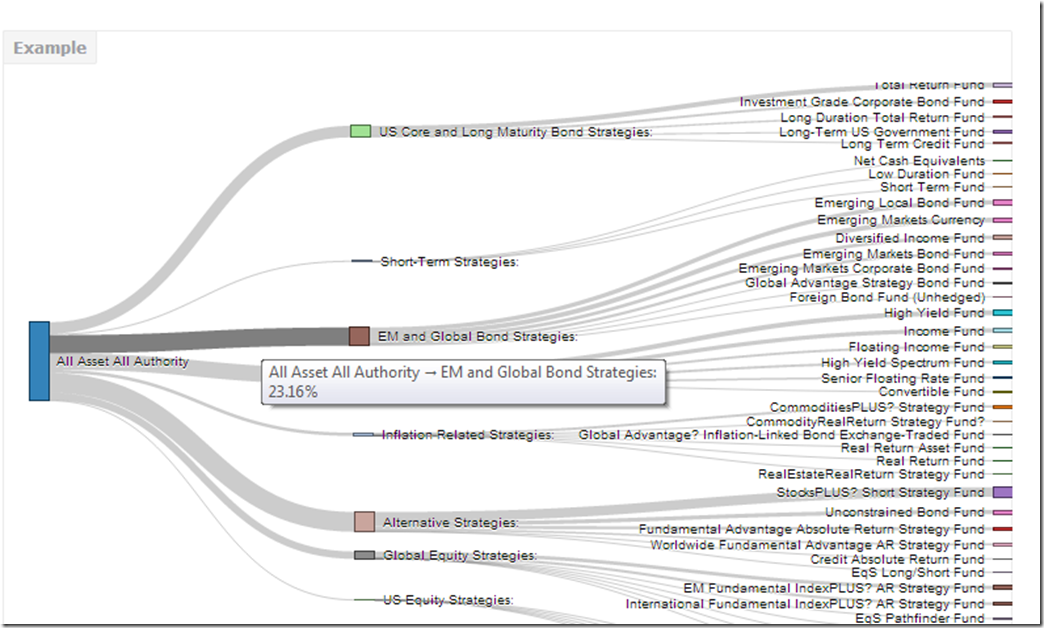
Blogger makes it hard to incorporate d3 directly into this post, so click here or on the screenshot below, to engage and interact with the sankey.
example_pimco

Just for good measure, here is the default plot from igraph.

image

Of course we could also plot the data a little more traditionally with a ggplot2 bar chart.

image


Any way we look at it, we can see that PIMCO now has way more than just bonds and the fund All Asset All Authority uses almost everything.

Tuesday, July 16, 2013

Exploring Networks with Sankey

Motivated by a tweet from Tony Hirst (http://blog.ouseful.info/), I started experimenting with an rCharts implementation of the d3 sankey plugin.  While I was putting together examples, I found lots of gaps in my knowledge of sankeys and network analysis.  I did not want to let good learning go to waste, so I put together this quick tutorial documenting what I learned.  Click here or on the screenshot below to see it.

For those wondering how this might be useful in finance, sankeys could be employed well in Portfolio Appraisal/Holdings type reports where nodes represent household, client accounts, asset classes, and security types.  Edge weight would be $ or % in each.

image

Wednesday, July 10, 2013

rCharts version of d3 horizon

I love horizon plots.  My love shows up throughout my blog, and I have plotted horizon charts in base graphics, xtsExtra, lattice, and ggplot2.  Now with rCharts, we can implement Jason Davies d3.js horizon chart plugin to plot R data in html/javascript.  I put together a tutorial going into great detail on rCharts and convertin custom charts.  For the tutorial, go here, or click on the screenshot below.

image

Friday, June 28, 2013

rCharts Remake of NYT

For those wondering if I have forsaken finance, the answer is no.  I just don’t think there is much to do in here besides watch and wait.  So more d3 and R as I try to distract myself from doing something dumb in the markets.

This time I used rCharts and slidify to  recreate another NYT visualization similar to what I did in 512 Paths to the White House.  Now with any cumulative growth time series that we build in R we can apply the template and create this amazing visualization.  Below is a screenshot.  Click here to see the live version.

nyt home price rcharts

I’ll be living the good life over the next week, so no posts until after the 4th of July.

Thursday, June 27, 2013

dimple d3 and rCharts

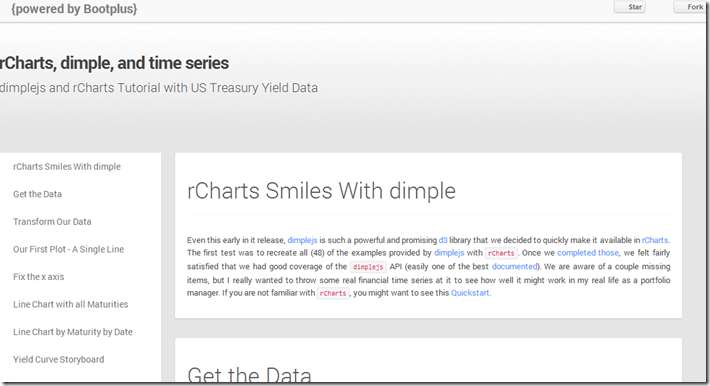
I put together a quick tutorial combining my two favorite things: finance and interactive visualizations.  I show how to use the new dimplejs d3 library with rCharts to create some nice interactive plots of US Treasury yield data.   A screenshot is below.  Go here for the tutorial and here for the code to reproduce.

image

Wednesday, June 19, 2013

R Plotting Financial Time Series

In my little world of finance, data almost always is a time series.  Through both quiet iteration and significant revolutions, the volunteers of R have made analyzing and charting time series pleasant.  As a mini-tribute to all those who have helped, I wanted to write a short history of R time series plotting, specifically focusing on financial time series.  I have embedded below, but it will look much better if you go to Github pages version.

Tuesday, June 11, 2013

Rickshaw d3.js from R with rCharts

Shutterstock’s open source Rickshaw provides a very nice tutorial to get started building interactive time series d3.js charts with Rickshaw.  I just could not resist rebuilding the tutorial but this time ENTIRELY in R with the amazing packages slidify and rCharts.  I have embedded the tutorial below, but it will probably look much better if you go directly to the Github pages version.

The slidify and rCharts author Ramnath Vaidyanathan has done an incredible job and continues to perfect these fine tools.  They completely transformed my workflow and output by allowing both dynamic and interactive components that I can combine into a beautiful document.  Be sure to see him present to this NYHackr meetup  on June 17, 2013.

Thursday, May 30, 2013

If…then in Japan

If Japan starts to spiral out of control, then what do they do? A spiral would be a sudden move higher in JGB rates with a simultaneous crash in the Japanese Yen. Their response would be to try to slow the positive feedback loop through external intervention. Fortunately for Japan, they have amassed a significant reserve position of 1.2 trillion compared to a US reserve position of 135 billion, so they do have some firepower.
require(latticeExtra)
require(quantmod)

japanReserves <- getSymbols("TRESEGJPM052N", src = "FRED", 
    auto.assign = FALSE)
asTheEconomist(xyplot(japanReserves, scales = list(y = list(rot = 1)), 
    main = "Japan Foreign Reserves excluding Gold"))


From TimelyPortfolio

Based on data from the US Treasury, 1.1 trillion of the 1.2 trillion of Japanese foreign reserves are US Treasury bonds. If Japan decides (is forced) to liquidate, the only thing they have to liquidate are US Treasury bonds. Who will buy if they sell? What happens next?
# get data from US Treasury for top 10 foreign
# holders of US treasuries
foreignUSTreas <- read.csv("http://www.treasury.gov/resource-center/data-chart-center/tic/Documents/mfhhis01.csv", 
    skip = 4, nrows = 13, stringsAsFactors = FALSE)
top10 <- data.frame(foreignUSTreas[4:13, 1:2])
colnames(top10) <- c("Country", "Value")
top10$Value <- as.numeric(top10$Value)
top10$Country <- factor(top10$Country, levels = top10$Country[order(top10$Value)])

barchart(Country ~ Value, data = top10, origin = 0, 
    xlab = "Value (in $Billions)", main = "Foreign Holders of US Treasuries - Top 10", 
    scales = list(y = list(alternating = 3)), par.settings = theEconomist.theme(box = "transparent"), 
    lattice.options = theEconomist.opts())


From TimelyPortfolio


For those comparing the Federal Reserve H4 data to the US Treasury TIC data, this is a very good summary http://www.treasury.gov/resource-center/data-chart-center/tic/Pages/ticfaq2.aspx#q10.

Tuesday, May 28, 2013

Intended or Unintended Consequences

A quick glimpse at the US 10y Treasury Bond rate since 2000 seems benign with low volatility and a general downward trend.

require(latticeExtra)
require(quantmod)

US10y <- getSymbols("^TNX", from = "2000-01-01", auto.assign = FALSE)[,
4]

asTheEconomist(xyplot(US10y, scales = list(y = list(rot = 1)),
main = "US 10y Yield Since 2000"))


From TimelyPortfolio

However, if we plot the change in rate over 252 days or 1 year, we might wonder whether the rate is as benign as we initially surmised. Although this might seem like an acceptable intended consequence of the aggressive monetary easing by the US Fed, I fear that we will face the historically normal unintended consequences.

p1 <- asTheEconomist(xyplot(US10y - lag(US10y, 252), 
scales = list(y = list(rot = 0)), main = "US 10y Yield - Yearly Change"))
p1


From TimelyPortfolio

And if we use some Vanguard US Bond Funds (vbmfx and vustx) as a proxy for the US bond market Approaching the Zero Bound - Bonds, we see that we are now in a market different than the last 4 years.

require(directlabels)
require(reshape2)

getSymbols("VUSTX", from = "1990-01-01")
## [1] "VUSTX"
getSymbols("VBMFX", from = "1990-01-01")
## [1] "VBMFX"

bonds.tr <- merge(ROC(VUSTX[, 6], 250), ROC(VBMFX[,
6], 250))
colnames(bonds.tr) <- c("VanguardLongTsy", "VanguardTotBnd")
bond.funds.melt <- melt(as.data.frame(cbind(as.Date(index(bonds.tr)),
coredata(bonds.tr))), id.vars = 1)
colnames(bond.funds.melt) <- c("date", "fund", "totret250")
bond.funds.melt$date <- as.Date(bond.funds.melt$date)

p2 <- direct.label(xyplot(bonds.tr, screens = 1, ylim = c(-0.35,
0.35), scales = list(y = list(rot = 0)), col = theEconomist.theme()$superpose.line$col,
par.settings = theEconomist.theme(box = "transparent"),
lattice.options = theEconomist.opts(), xlab = NULL,
main = "Vanguard Bond Funds 250 Day Total Return"),
list("last.points", hjust = 1, cex = 1.2))
p2


From TimelyPortfolio

p3 <- asTheEconomist(horizonplot(totret250 ~ date |
fund, origin = 0, horizonscale = 0.05, data = bond.funds.melt,
strip = TRUE, strip.left = FALSE, par.strip.text = list(cex = 1.1),
layout = c(1, 2), main = "Vanguard Bond Funds 250 Day Total Return"))
p3


From TimelyPortfolio

# print(p2,position=c(0,0.4,1,1),more=TRUE)
# print(update(p3,main=NULL),position=c(0,0,1,0.5))

Comparison to Japan


For some reference, let's look at a country getting quite a bit of attention lately in the press. We can add US yields to my favorite chart from Japan - JGB Yields–More Lattice Charts. Most of the difference is in the short end of the curve where the US is still near the minimum since 2012 while Japan is near the max out to 7 years.

url <- "http://www.mof.go.jp/english/jgbs/reference/interest_rate/"
filenames <- paste("jgbcme",c("","_2010","_2000-2009","_1990-1999","_1980-1989","_1974-1979"),".csv",sep="")

#load all data and combine into one jgb data.frame
jgb <- read.csv(paste(url,filenames[1],sep=""),stringsAsFactors=FALSE)
for (i in 2:length(filenames)) {
jgb <- rbind(jgb,read.csv(paste(url,"/historical/",filenames[i],sep=""),stringsAsFactors=FALSE))
}

#now clean up the jgb data.frame to make a jgb xts
jgb.xts <- as.xts(data.matrix(jgb[,2:NCOL(jgb)]),order.by=as.Date(jgb[,1]))
colnames(jgb.xts) <- paste0(gsub("X","JGB",colnames(jgb.xts)))

#get Yen from the Fed
#getSymbols("DEXJPUS",src="FRED")

xtsMelt <- function(data) {
require(reshape2)

#translate xts to time series to json with date and data
#for this behavior will be more generic than the original
#data will not be transformed, so template.rmd will be changed to reflect


#convert to data frame
data.df <- data.frame(cbind(format(index(data),"%Y-%m-%d"),coredata(data)))
colnames(data.df)[1] = "date"
data.melt <- melt(data.df,id.vars=1,stringsAsFactors=FALSE)
colnames(data.melt) <- c("date","indexname","value")
#remove periods from indexnames to prevent javascript confusion
#these . usually come from spaces in the colnames when melted
data.melt[,"indexname"] <- apply(matrix(data.melt[,"indexname"]),2,gsub,pattern="[.]",replacement="")
return(data.melt)
#return(df2json(na.omit(data.melt)))

}


jgb.melt <- xtsMelt(jgb.xts["2012::",])
jgb.melt$date <- as.Date(jgb.melt$date)
jgb.melt$value <- as.numeric(jgb.melt$value)
jgb.melt$indexname <- factor(
jgb.melt$indexname,
levels = colnames(jgb.xts)
)
jgb.melt$maturity <- as.numeric(
substr(
jgb.melt$indexname,
4,
length( jgb.melt$indexname ) - 4
)
)
jgb.melt$country <- rep( "Japan", nrow( jgb.melt ))

#now get the US bonds from FRED
USbondssymbols <- paste0("DGS",c(1,2,3,5,7,10,20,30))

ust.xts <- xts()
for (i in 1:length( USbondssymbols ) ) {
ust.xts <- merge(
ust.xts,
getSymbols(
USbondssymbols[i],
auto.assign = FALSE,
src = "FRED"
)
)
}

ust.melt <- na.omit( xtsMelt( ust.xts["2012::",] ) )

ust.melt$date <- as.Date(ust.melt$date)
ust.melt$value <- as.numeric(ust.melt$value)
ust.melt$indexname <- factor(
ust.melt$indexname,
levels = colnames(ust.xts)
)
ust.melt$maturity <- as.numeric(
substr(
ust.melt$indexname,
4,
length( ust.melt$indexname ) - 4
)
)
ust.melt$country <- rep( "US", nrow( ust.melt ))

bonds.melt <- rbind( jgb.melt, ust.melt )

p4 <- xyplot(
value ~ date | maturity,
groups = country,
data = bonds.melt,
type = "l",
col = c(brewer.pal(9,"Blues")[5],brewer.pal(9,"Blues")[7]),
layout = c( length( unique( bonds.melt$maturity ) ), 1 ),
panel = function(x, y, subscripts, col, ...) {
panel.abline(
h = c(
sapply( by( y, bonds.melt[subscripts,"country"], summary ), min ),
sapply( by( y, bonds.melt[subscripts,"country"], summary ), max )
),
#if(!col){
col = col[1:length(unique(bonds.melt[subscripts,"country"]))]
#} else col = trellis.par.get()$superpose.line$col[1:length(unique(bonds.melt[subscripts,"country"]))]
)
panel.xyplot( x = x, y = y, subscripts = subscripts, col = col, ... )
panel.text(
x = x[ length(unique(x)) / 2],
y = mean(
c(
sapply( by( y, bonds.melt[subscripts,"country"], summary ), max )[1],
sapply( by( y, bonds.melt[subscripts,"country"], summary ), min )[2]
)
),
labels = paste0(unique(bonds.melt$maturity)[panel.number()],"y"),
cex = 0.8,
#font = 2,
col = "black",
adj = c(0.5,0.5)
)
},
scales = list(
x = list(
draw = FALSE
#tck = c(1,0),
#alternating = 1,
#at = min(bonds.melt$date),
#labels = format(min(bonds.melt$date),"%Y")
),
y = list( tck = c(1,0), lwd = c(0,1) )
),
strip = FALSE,
par.settings = list(axis.line = list(col = 0)),
xlab = NULL,
ylab = "Yield",
main = "JGB and US Yields by Maturity Since Jan 2012"
)
p4 <- p4 + layer(
panel.abline(
h = pretty(bonds.melt$value,4),
lty = 3
)
)
p4


From TimelyPortfolio

Replicate

Gist source: https://gist.github.com/timelyportfolio/5665790

Wednesday, May 15, 2013

Even More JGB Yield Charts with R lattice

See the last post for all the details. I just could not help creating a couple more.

Variations on Favorite Plot - Time Series Line of JGB Yields by Maturity

p2 <- xyplot(value ~ date | indexname, data = jgb.melt, 
type = "l", layout = c(length(unique(jgb.melt$indexname)),
1), panel = function(x, y, ...) {
panel.abline(h = c(min(y), max(y)))
panel.xyplot(x = x, y = y, ...)
panel.text(x = x[length(x)/2], y = max(y),
labels = levels(jgb.melt$indexname)[panel.number()],
cex = 0.7, pos = 3)
}, scales = list(x = list(tck = c(1, 0), alternating = 1),
y = list(tck = c(1, 0), lwd = c(0, 1))), strip = FALSE,
par.settings = list(axis.line = list(col = 0)),
xlab = NULL, ylab = "Yield", main = "JGB Yields by Maturity Since Jan 2012")
p2 <- p2 + layer(panel.abline(h = pretty(jgb.melt$value),
lty = 3))
p2


From TimelyPortfolio


jgb.xts.diff <- jgb.xts["2012::", ] - matrix(rep(jgb.xts["2012::",
][1, ], NROW(jgb.xts["2012::", ])), ncol = NCOL(jgb.xts),
byrow = TRUE)
jgb.diff.melt <- xtsMelt(jgb.xts.diff)
jgb.diff.melt$date <- as.Date(jgb.diff.melt$date)
jgb.diff.melt$value <- as.numeric(jgb.diff.melt$value)
jgb.diff.melt$indexname <- factor(jgb.diff.melt$indexname,
levels = colnames(jgb.xts))

p4 <- xyplot(value ~ date | indexname, data = jgb.diff.melt,
type = "h")

update(p2, ylim = c(min(jgb.diff.melt$value), max(jgb.melt$value) +
0.5)) + p4


From TimelyPortfolio


update(p2, ylim = c(min(jgb.diff.melt$value), max(jgb.melt$value) +
0.5), par.settings = list(axis.line = list(col = "gray70"))) +
update(p4, panel = function(x, y, col, ...) {
# do color scale from red(negative) to
# blue(positive)
cc.palette <- colorRampPalette(c(brewer.pal("Reds",
n = 9)[7], "white", brewer.pal("Blues",
n = 9)[7]))
cc.levpalette <- cc.palette(20)
cc.levels <- level.colors(y, at = do.breaks(c(-0.3,
0.3), 20), col.regions = cc.levpalette)
panel.xyplot(x = x, y = y, col = cc.levels,
...)
})


From TimelyPortfolio


p5 <- horizonplot(value ~ date | indexname, data = jgb.diff.melt,
layout = c(1, length(unique(jgb.diff.melt$indexname))),
scales = list(x = list(tck = c(1, 0))), xlab = NULL,
ylab = NULL)

p5


From TimelyPortfolio


update(p2, ylim = c(0, max(jgb.melt$value) + 0.5),
panel = panel.xyplot) + p5 + update(p2, ylim = c(0,
max(jgb.melt$value)))


From TimelyPortfolio


Variations on Yield Curve Evolution with Opacity Color Scale

# add alpha to colors
addalpha <- function(alpha = 180, cols) {
rgbcomp <- col2rgb(cols)
rgbcomp[4] <- alpha
return(rgb(rgbcomp[1], rgbcomp[2], rgbcomp[3],
rgbcomp[4], maxColorValue = 255))
}

p3 <- xyplot(value ~ indexname, group = date, data = jgb.melt,
type = "l", lwd = 2, col = sapply(400/(as.numeric(Sys.Date() -
jgb.melt$date) + 1), FUN = addalpha, cols = brewer.pal("Blues",
n = 9)[7]), main = "JGB Yield Curve Evolution Since Jan 2012")

p3 <- update(asTheEconomist(p3), scales = list(x = list(cex = 0.7))) +
layer(panel.text(x = length(levels(jgb.melt$indexname)),
y = 0.15, label = "source: Japanese Ministry of Finance",
col = "gray70", font = 3, cex = 0.8, adj = 1))

# make point rather than line
update(p3, type = "p")


From TimelyPortfolio


# make point with just most current curve as line
update(p3, type = "p") + xyplot(value ~ indexname,
data = jgb.melt[which(jgb.melt$date == max(jgb.melt$date)),
], type = "l", col = brewer.pal("Blues", n = 9)[7])


From TimelyPortfolio


Replicate Me with code at Gist